SDK Integration
Initialize VGPLifecycle in Application Class
If your game doesn't have an application class, you should create one.
First, import our lifecycle:
import com.vgp.sdk.initializer.VGPLifeCycle;
Add our lifecycle to your onCreate method of your application class:
VGPLifeCycle.getInstance(this);
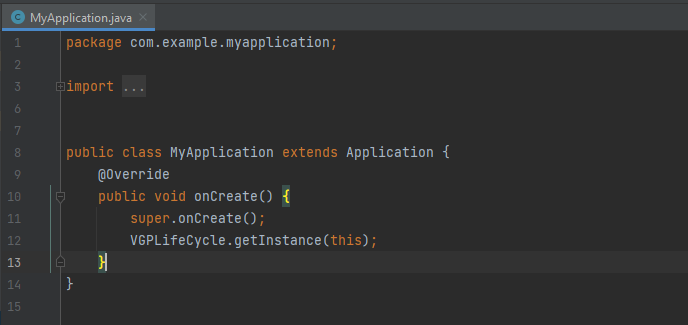
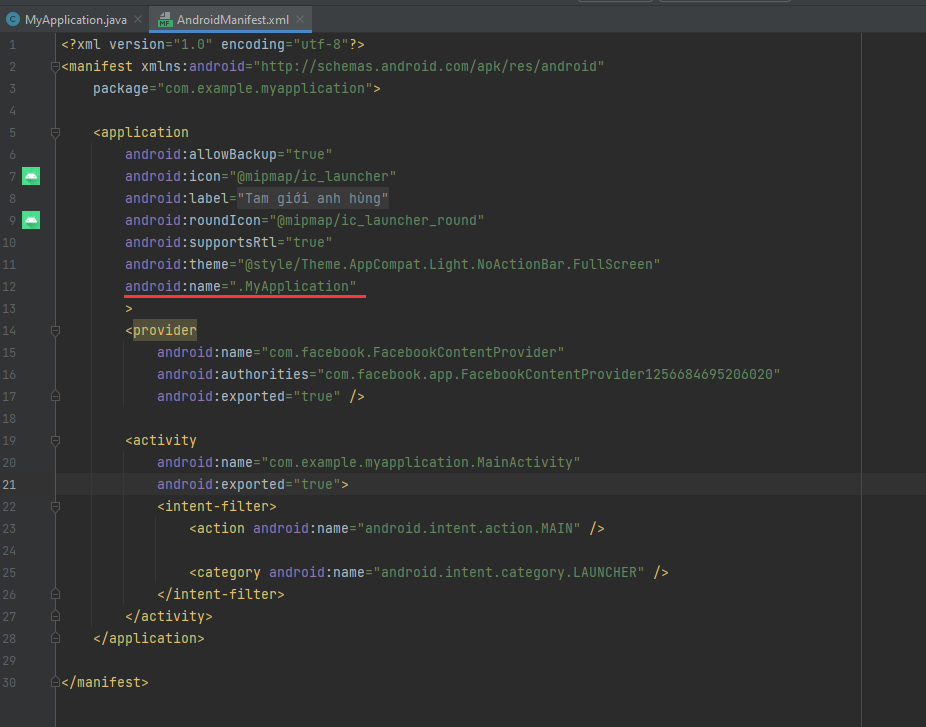
Remember to register your application class in androidmanifest.xml:
Implement Interface VGPSDKCallbackImpl
import com.vgp.sdk.interfaces.VGPSDKCallback;
import com.vgp.sdk.data.model.UserInfo;
//...

Public class VGPSDKCallbackImpl implements VGPSDKCallback() {

    @Override
    public void onUserLoginSuccess(UserInfo user) {
        // Get VGPID
        user.getId();     // type long
        // Get VGP name
        user.getUsername();   // type string
        // Get VGP session token of current user
        user.getUser_token();    // type string
    }

    @Override
    public void onUserLogout() {

    }

    @Override
    public void onPaymentFinished() {
        // payment finish
    }

    @Override
    public void onPaymentSuccess() {
        Toast.makeText(MainActivity.this, "Payment success", Toast.LENGTH_LONG).show();
        //log purchase
        VGPTracking.getInstance().logPurchase(money, item_id);
    }
}
Initialize SDK
Put code line below to bottom of onCreate method on your activity:
import com.vgp.sdk.VGPGameSDK;

//.... do another stuff
VGPGameSDK.getInstance().init(this, this);
Android App Links
Android App Links are verified HTTPS deep links that open your app directly when users click https://vgplay.vn/... URLs — no disambiguation dialog is shown.
Add Intent Filter to AndroidManifest.xml
Add the following intent-filter to your launcher Activity (the Activity with android.intent.action.MAIN):
<!-- App Links: verified deep links via https://vgplay.vn -->
<intent-filter android:autoVerify="true">
    <action android:name="android.intent.action.VIEW" />
    <category android:name="android.intent.category.DEFAULT" />
    <category android:name="android.intent.category.BROWSABLE" />
    <data
        android:scheme="https"
        android:host="vgplay.vn" />
</intent-filter>
Set Game Version
This code is for our logger, please call it when application starts:
String game_version = "x.x.x"; //important: change this game version to match with your current game update version, ex: 1.1.1
VGPGameSDK.getInstance().setGameVersion(game_version);
Force-update detection
When the server marks the running SDK build as below the minimum supported version, the SDK invokes a callback once per app session on the main thread. The SDK does not show any UI — your game must render its own localized, branded "please update" screen and gate access to gameplay until the user updates.
Register a listener once (e.g. in Application.onCreate, or before init). Late registration still works — if the SDK detected the condition before you registered, the callback is delivered immediately on the main thread:
import com.vgp.sdk.s2s.S2SIntegration;

S2SIntegration.getInstance().setForceUpdateListener((requiredVersion, currentVersion) -> {
    // requiredVersion: server-mandated minimum, e.g. "6.5.2"
    // currentVersion : currently-running SDK version, e.g. "6.5.0"
    // Show your update prompt, then disable login / gameplay.
});
For a synchronous check (e.g. before allowing a login button to enable):
if (S2SIntegration.getInstance().isForceUpdateRequired()) {
    // Block login, show update UI.
}
Show Login Dialog
The login dialog will show if user clicks on login game button.
Call this to show login form:
VGPGameSDK.getInstance().showLogin(MainActivity.this);
Show User Information
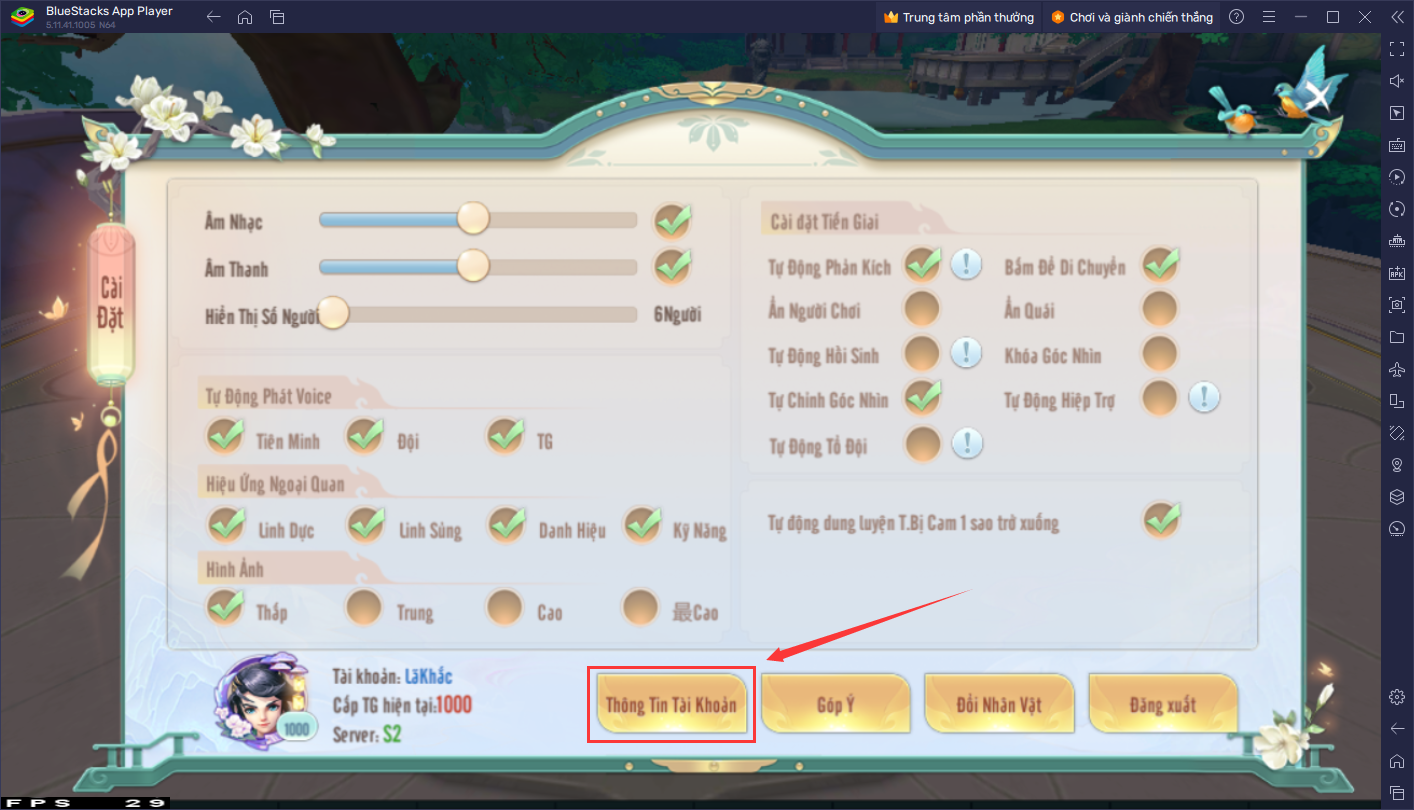
Create a button in the game settings section to display account information, with the text "Thông tin tài khoản":
VGPGameSDK.getInstance().showUserInformation(MainActivity.this);
Payment
To initiate a payment process, call the function VGPGameSDK.getInstance().purchase(MainActivity.this, vgpPayModel);.
This function is part of the VGPGameSDK library and takes two parameters: the context (MainActivity.this) and the vgpPayModel object.
import com.vgp.sdk.model.VGPPayModel;

// Do another stuff

String serverID = "your_server_id";// server that user playing
String characterID = "your_character_id";//id of character who purchase this item
String partner_token = "partner_token"; // custom string you want to receive in your game server : 0<= partner_token.length() <=50
String itemID = "gold.xxx.17000";//ID of item
VGPPayModel vgpPayModel = new VGPPayModel(serverID, characterID, partner_token, itemID);
VGPGameSDK.getInstance().purchase(MainActivity.this, vgpPayModel);
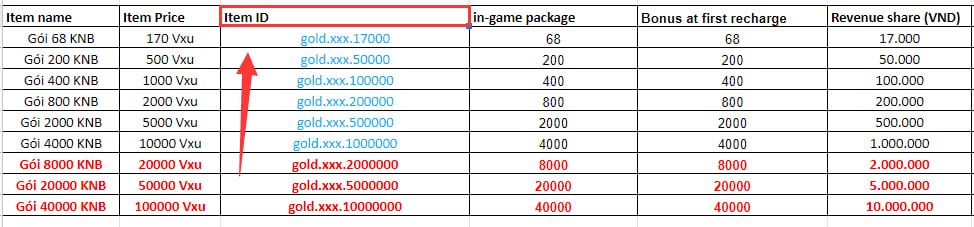
NOTE: This is an example recharge list. Each game may have a different recharge list. We will provide you with the recharge list later.
Get SDK Sign-in Status
To check if a user is logged in, you need to call the following:
VGPGameSDK.getInstance().isSignedIn();
Get Current User Info
To retrieve the information of the current user, you need to call the following:
VGPGameSDK.getInstance().getUserInfo();
Logout
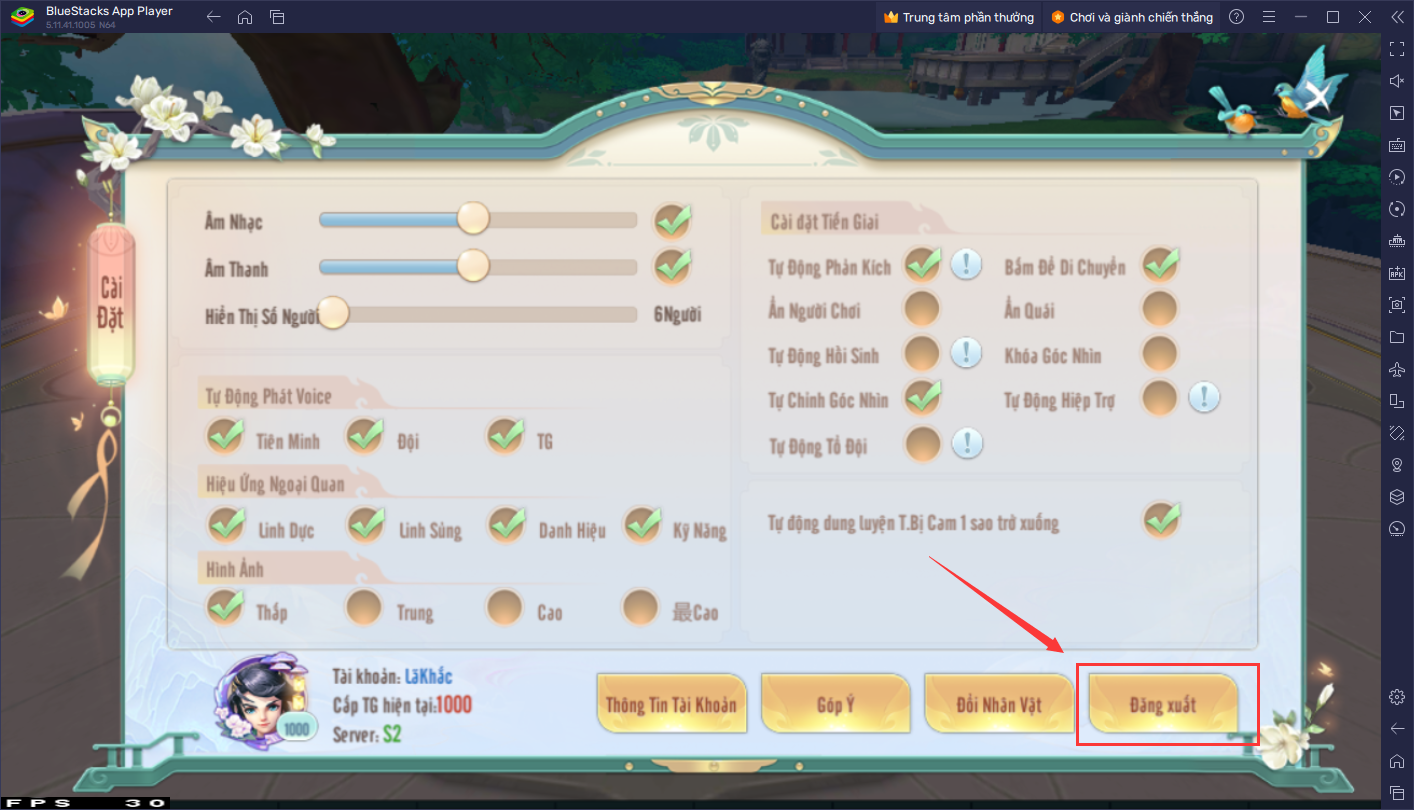
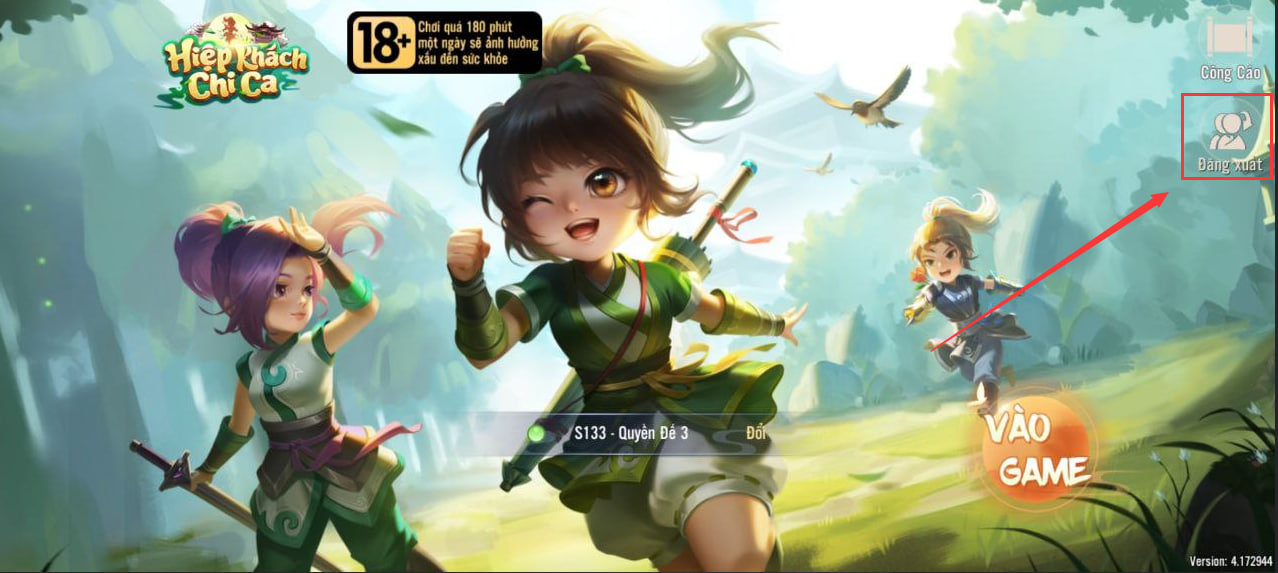
Create a Button in the game settings to display Logout Account, with text = "Đăng Xuất":
VGPGameSDK.getInstance().logout();
And
VGP Tracking
The purpose of the VGP Tracking module is to provide 3 methods for logging analytics data for our marketing team. These methods allow us to track various user actions and events within the game. We utilize both Firebase and Facebook Analytics for logging purposes.
When the game runs in server-to-server (S2S) mode, the SDK pulls the Firebase Analytics App Instance ID (the 32-char hex ID that backs Measurement Protocol - not the FirebaseInstallations FID) automatically and forwards it on every event so server-side dispatchers can target the Firebase Measurement Protocol. No additional integration code is required - keep the
firebase-analyticsdependency (already pulled in via the Firebase BOM that this SDK ships with) and the value is collected on first launch.
Logging Character Level Up
To log a character level up event, simply call the following method:
import com.vgp.sdk.tracking.VGPTracking;
// Log character level up
VGPTracking.getInstance().logLevelUp(currentLevel);  // 'currentLevel' is a long type
Example: When a user reaches level 100, you can log the event as follows:
import com.vgp.sdk.tracking.VGPTracking;
// Log character level up
VGPTracking.getInstance().logLevelUp(100);
Logging Created Character
To record an event when a user has successfully created a new character, use the following method:
import com.vgp.sdk.tracking.VGPTracking;
// Log created character
VGPTracking.getInstance().logCreatedCharacter();
Logging Purchase
After a user successfully purchases an item and you have added virtual currency (vxu) to the user's account, you can log the purchase event along with the revenue share and item ID. Use the following method:
import com.vgp.sdk.tracking.VGPTracking;
// Log purchase
VGPTracking.getInstance().logPurchase(revenueShare, itemID);  // 'revenueShare' is a double type
Please log the money value in the "Revenue share (VND)" column as a reference. For example, if a user receives 85 (xu) in-game, you can log the event as follows:
import com.vgp.sdk.tracking.VGPTracking;
//... do other stuff
VGPTracking.getInstance().logPurchase(17000, "gold.xxx.17000");
This logs 17000 VND as the revenue share and "gold.xxx.17000" as the item ID.
Share Image to Facebook
If your game supports sharing images to Facebook, you can use the Facebook share function integrated into VGP SDK.
First, you need to add this code to AndroidManifest.xml under Application tag:
<provider
    android:name="com.facebook.FacebookContentProvider"
    android:authorities="com.facebook.app.FacebookContentProviderFACEBOOKID"
    android:exported="true" />
Which Facebook ID was provided to you in Readme file in SDK package.
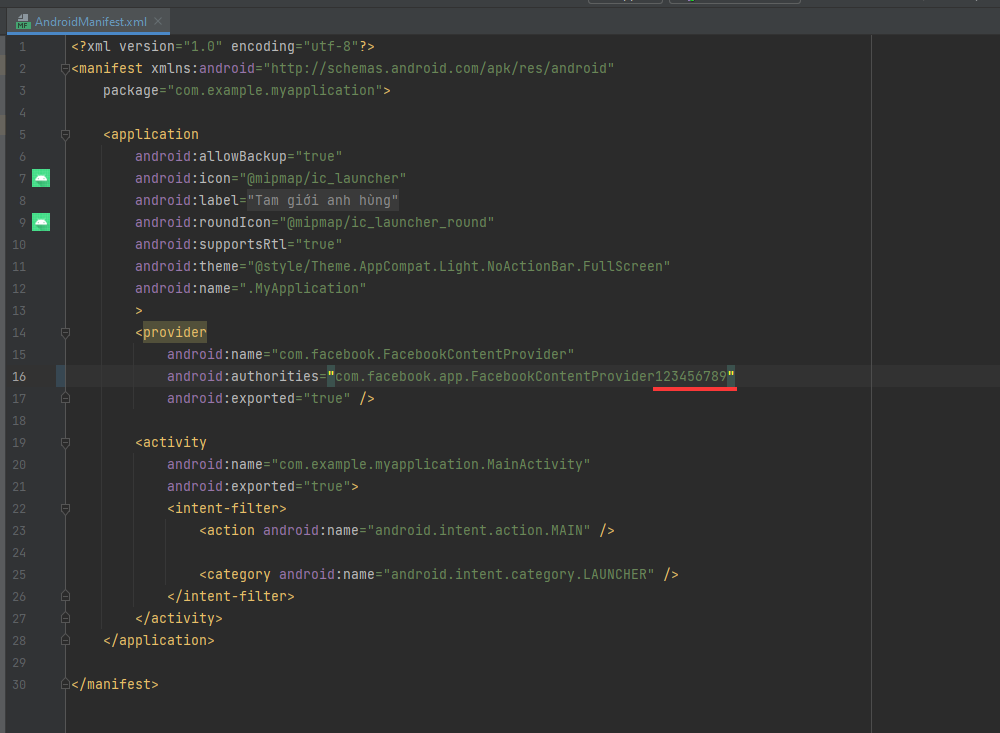
For example, if your game has Facebook ID = 123456789, you can use this code like this:
<provider
    android:name="com.facebook.FacebookContentProvider"
    android:authorities="com.facebook.app.FacebookContentProvider123456789"
    android:exported="true" />
Second, you need to add this code to your activity:
@Override
protected void onActivityResult(int requestCode, int resultCode, Intent data) {
    super.onActivityResult(requestCode, resultCode, data);
    FacebookShareHelper.onActivityResult(requestCode, resultCode, data);
}
Next step, to share to Facebook you can use this code.
For share using remote URL:
String urlImage = "https://www.w3schools.com/w3css/img_fjords.jpg"; //Example url image for post to facebook
FacebookShareHelper.getInstance().shareImageToFB(MainActivity.this, urlImage, new FacebookCallback<Sharer.Result>() {
    @Override
    public void onSuccess(Sharer.Result result) {
        Log.d("Facebook", "share success");
    }
    @Override
    public void onError(FacebookException error) {
        Log.d("Facebook", "share failed");
    }
    @Override
    public void onCancel() {
        Log.d("Facebook", "share cancelled");
    }
});
OR for share using bitmap:
Bitmap bitmap; // bitmap you want to share
FacebookShareHelper.getInstance().shareImageToFB(MainActivity.this, bitmap, new FacebookCallback<Sharer.Result>() {
    @Override
    public void onSuccess(Sharer.Result result) {
        Log.d("Facebook", "share success");
    }
    @Override
    public void onError(FacebookException error) {
        Log.d("Facebook", "share failed");
    }
    @Override
    public void onCancel() {
        Log.d("Facebook", "share cancelled");
    }
});
Payment Pending
The checkPaymentPending() method is utilized to verify if there are any pending payment transactions awaiting processing from the server. This method is used when users join the game server and display the main interface of the game.
Usage Example:
VGPGameSDK.getInstance().checkPaymentPending(MainActivity.this);
In this usage, the checkPaymentPending() method is called within the context of the MainActivity to check for pending payment transactions associated with the game server.
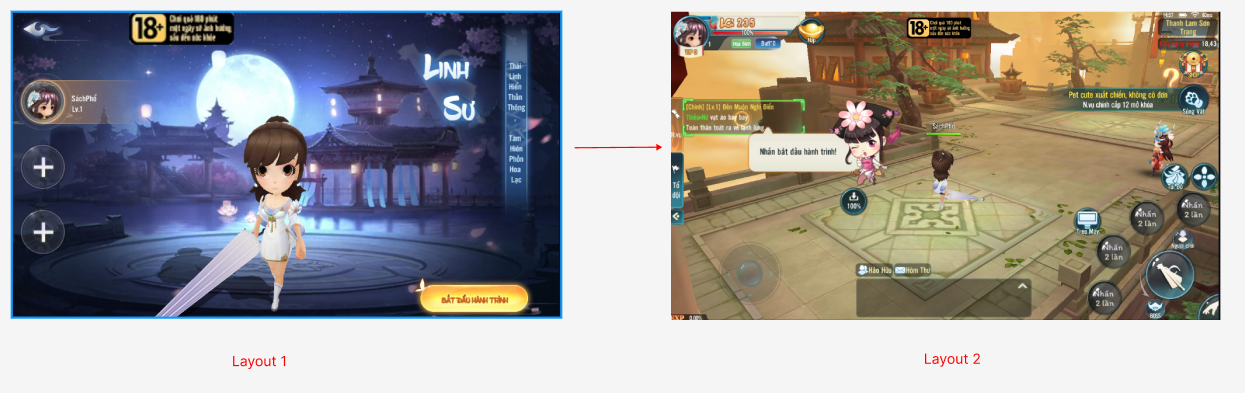
- Used when starting to display Layout 2
Reference
com.vgp.sdk.data.model.UserInfo
Meaning
Store principal info
Functions
| Function | Meaning |
|---|---|
public long getId() | Get vgp id |
public String getUser_token() | Get vgp token to validate session |
public String getUsername() | Get vgp username |