Frameworks & Assets
Via CocoaPods (recommended, v5.1.2+)
Since v5.1.2, VGPSDK.xcframework and VGPSDK.bundle are delivered automatically when you run pod install. No manual copying is needed.
Still required — copy these files from the sample project into your Xcode project:
| File | Where to add |
|---|---|
GoogleService-Info.plist | Project root (same level as Info.plist) |
vgp_config.json | Project root, add to Copy Bundle Resources build phase |
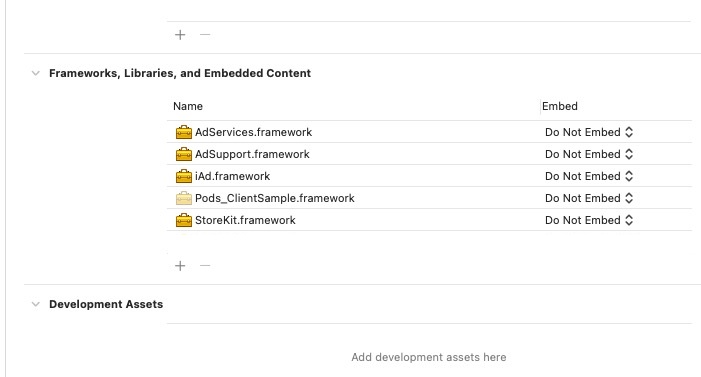
System Frameworks
Add these Apple frameworks in Xcode → Target → General → Frameworks, Libraries, and Embedded Content:
| Framework | Notes |
|---|---|
AdServices.framework | Ad attribution (iOS 14.3+) |
AdSupport.framework | IDFA access |
StoreKit.framework | In-app purchases |
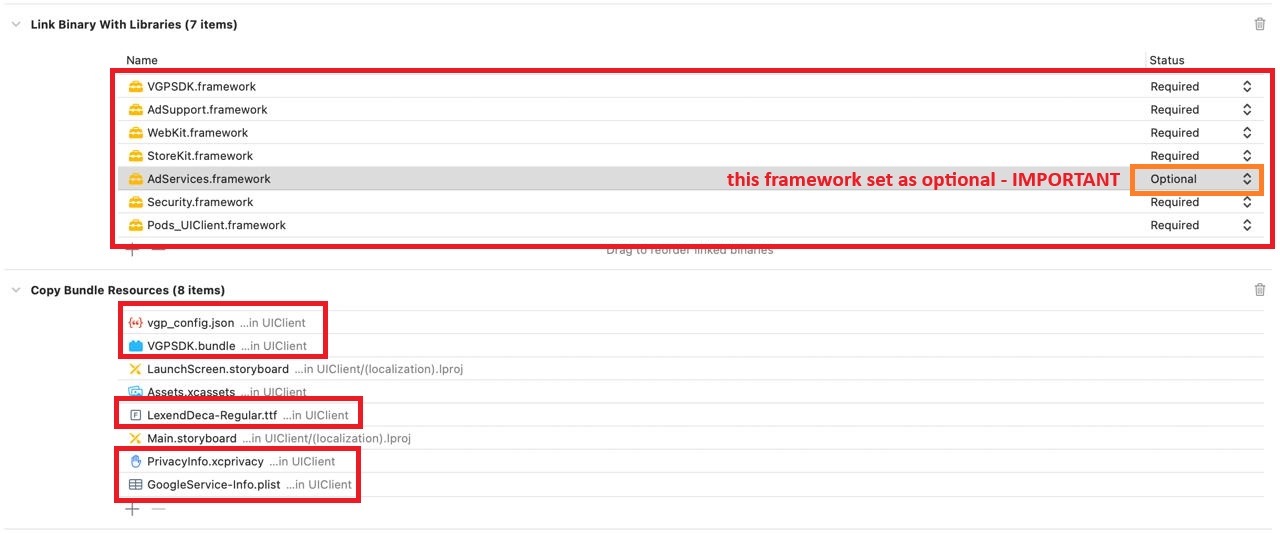
iAd.frameworkwas removed in Xcode 16 — do not add it.