What's new in 6.0.1
- Server-to-Server (S2S) attribution — The SDK now supports server-side event routing for Meta CAPI, Adjust S2S, and TikTok Events API. When S2S mode is enabled from the server config, attribution events are routed server-side instead of client-side, improving accuracy and reducing SDK-side ad network calls.
- Adjust SDK updated to
~> 5.6.1. - Configuration validator (DEBUG only) — The SDK now checks your project setup at launch and shows an alert listing any missing frameworks, Info.plist keys, or other misconfigurations. This only runs in DEBUG builds and helps you catch integration issues early. See Project Configuration for the full checklist.
Migration guide
Choose the section that matches your current version.
From 5.2.5
Update Podfile
pod 'VGPSDK', '6.0.1'
Run pod install.
From 5.2.3
Update Podfile
pod 'VGPSDK', '6.0.1'
Run pod install.
Changelog since 5.2.3
- 5.2.5: Fix push notification crash when payload contains
nulllink value. SafetopViewControllerlookup using Scene API.
From 5.2.2
Remove SDK font files
If you manually added any SDK font files (e.g. .ttf or .otf) to your project, delete them and remove the corresponding UIAppFonts entries from Info.plist. Starting from 5.2.3, fonts are auto-loaded by the SDK.
Update Podfile
pod 'VGPSDK', '6.0.1'
Run pod install.
Changelog since 5.2.2
- 5.2.5: Fix push notification crash when payload contains
nulllink value. SafetopViewControllerlookup using Scene API. - 5.2.3: Bundle resources correctly included for CocoaPods. Font auto-loading at startup.
From 5.1.2
Remove manually added files
- Remove
VGPSDK.bundle— In Xcode, selectVGPSDK.bundlein the Project Navigator and press Delete → Remove Reference. Also remove it from Build Phases → Copy Bundle Resources if present. - Remove SDK font files — If you manually added any SDK font files (e.g.
.ttfor.otf), delete them and remove the correspondingUIAppFontsentries fromInfo.plist.
Update Podfile
pod 'VGPSDK', '6.0.1'
Run pod install.
Update Info.plist
Update SKAdNetworkItems with the latest identifiers from your Adjust dashboard and add the ATT usage description if not already present.
Follow the Project Configuration instructions.
Changelog since 5.1.2
- 5.2.5: Fix push notification crash when payload contains
nulllink value. SafetopViewControllerlookup using Scene API. - 5.2.3: Bundle resources correctly included for CocoaPods. Font auto-loading at startup.
- 5.2.2:
VGPSDK.bundledelivered automatically by CocoaPods. UpdatedSKAdNetworkItems.
From 5.0.1
Step 1: Remove VGPSDK.framework
If you previously added VGPSDK.framework manually in Frameworks, Libraries, and Embedded Content, remove it.
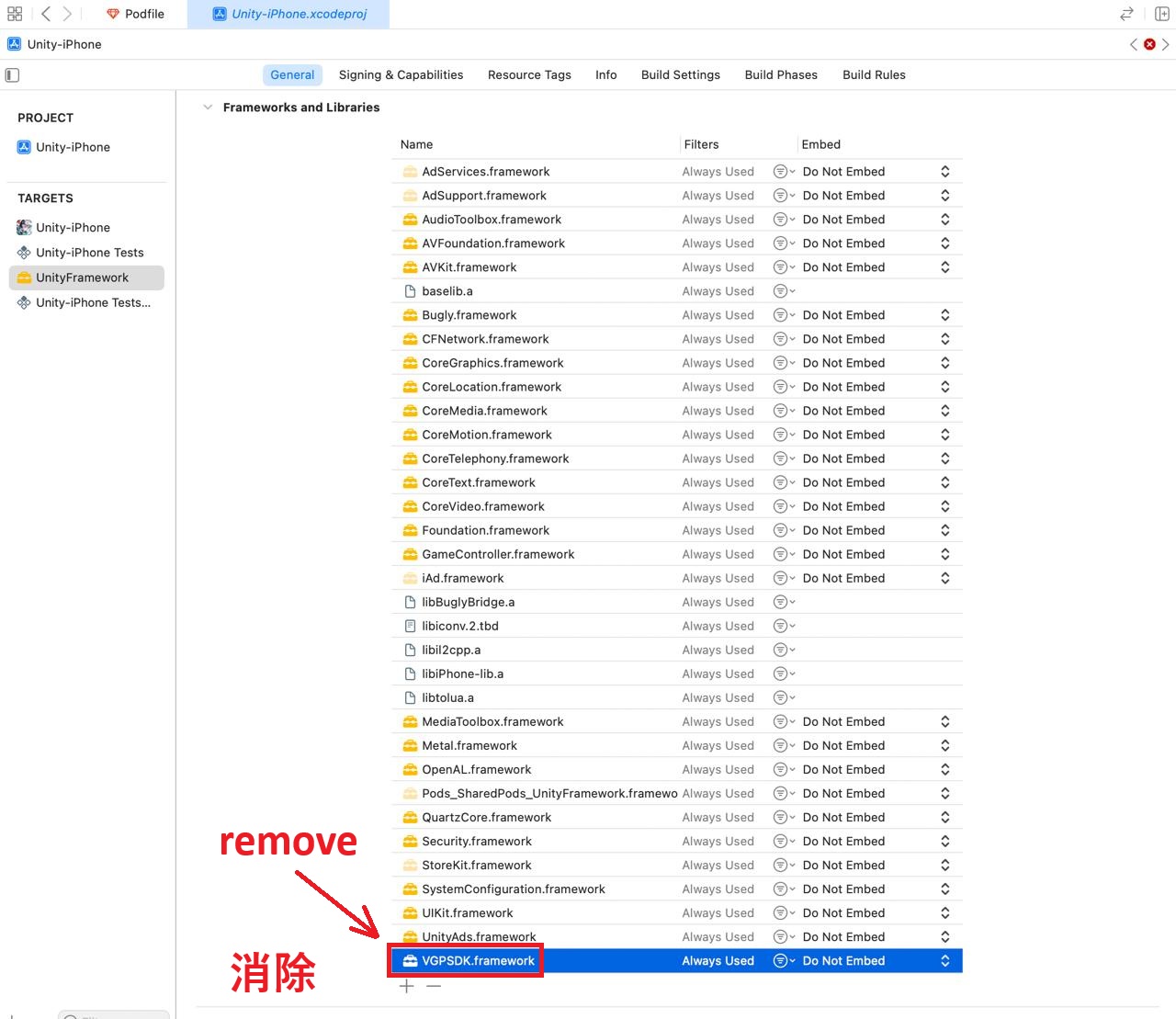
Step 2: Remove manually added files
- Remove
VGPSDK.bundle— In Xcode, selectVGPSDK.bundlein the Project Navigator and press Delete → Remove Reference. Also remove it from Build Phases → Copy Bundle Resources if present. - Remove SDK font files — If you manually added any SDK font files (e.g.
.ttfor.otf), delete them and remove the correspondingUIAppFontsentries fromInfo.plist.
Step 3: Update Podfile
Edit your Podfile to keep only pod 'VGPSDK' with the new version:
platform :ios, '13.0'

abstract_target 'SharedPods' do
  use_frameworks!
  use_modular_headers!

  # VGP framework
  pod 'VGPSDK', '6.0.1'

  # Example for Unity3D
  workspace 'Unity-iPhone'
  target 'Unity-iPhone' do
    project 'Unity/Unity-iPhone'
  end
  target 'UnityFramework' do
    project 'Unity/Unity-iPhone'
  end
end

post_install do |installer|
  installer.pods_project.targets.each do |target|
    target.build_configurations.each do |config|
      cflags = config.build_settings['OTHER_CFLAGS'] || ['$(inherited)']
      cflags << '-fembed-bitcode'
      config.build_settings['OTHER_CFLAGS'] = cflags
      config.build_settings['ALWAYS_EMBED_SWIFT_STANDARD_LIBRARIES'] = 'NO'
      config.build_settings['ONLY_ACTIVE_ARCH'] = 'NO'
      config.build_settings['IPHONEOS_DEPLOYMENT_TARGET'] = '13.0'
    end
  end
  # If you use VGPSDK in UnityFramework, add the following script
  Dir.glob("Pods/**/Pods*iPhone*.xcconfig").each do |xcconfig_path|
    puts "Patching #{xcconfig_path}"
    text = File.read(xcconfig_path)
    text.gsub!(/^OTHER_LDFLAGS.*$/, 'OTHER_LDFLAGS = -ObjC')
    File.write(xcconfig_path, text)
  end
end
Run pod deintegrate then pod install.
Step 4: Update Info.plist
Update SKAdNetworkItems with the latest identifiers from your Adjust dashboard and add the ATT usage description if not already present.
Follow the Project Configuration instructions.
Step 5: Fix UnityFramework issues (if applicable)
Follow the development environment instructions.
Changelog since 5.0.1
- 5.2.5: Fix push notification crash when payload contains
nulllink value. SafetopViewControllerlookup using Scene API. - 5.2.3: Bundle resources correctly included for CocoaPods. Font auto-loading at startup.
- 5.2.2:
VGPSDK.bundledelivered automatically by CocoaPods. UpdatedSKAdNetworkItems. - 5.1.2: Migrated from manual framework to CocoaPods distribution (
VGPSDK.xcframework). All dependencies managed by CocoaPods automatically.