SDK Integration
AppDelegate setup
AppDelegate.h — import the SDK:
#import <VGPSDK/VGPSDK.h>
AppDelegate.m — register event observers and forward lifecycle calls:
- (BOOL)application:(UIApplication *)application didFinishLaunchingWithOptions:(NSDictionary *)launchOptions {
  // Register VGP SDK event observers
  [[NSNotificationCenter defaultCenter] addObserver:self selector:@selector(LoginSuccess:)   name:VGP_EVENT_LOGIN_SUCCESS   object:nil];
  [[NSNotificationCenter defaultCenter] addObserver:self selector:@selector(LogoutSuccess:)  name:VGP_EVENT_LOGOUT_SUCCESS  object:nil];
  [[NSNotificationCenter defaultCenter] addObserver:self selector:@selector(SDKReady)        name:VGP_EVENT_INIT_READY      object:nil];
  [[NSNotificationCenter defaultCenter] addObserver:self selector:@selector(PurchaseSuccess) name:VGP_EVENT_PURCHASE_SUCCESS object:nil];

  return [[VGPInterface sharedInstance] application:application didFinishLaunchingWithOptions:launchOptions];
}

- (void)applicationDidBecomeActive:(UIApplication *)application {
  [[VGPInterface sharedInstance] applicationDidBecomeActive:application];
}

- (BOOL)application:(UIApplication *)application openURL:(NSURL *)url options:(NSDictionary<UIApplicationOpenURLOptionsKey,id> *)options {
  return [[VGPInterface sharedInstance] application:application openURL:url options:options];
}

// Universal Links
- (BOOL)application:(UIApplication *)application continueUserActivity:(NSUserActivity *)userActivity restorationHandler:(void (^)(NSArray<id<UIUserActivityRestoring>> * _Nullable))restorationHandler {
  return [[VGPInterface sharedInstance] application:application continueUserActivity:userActivity restorationHandler:restorationHandler];
}

// Push notification data
- (void)application:(UIApplication *)application didReceiveRemoteNotification:(NSDictionary *)userInfo fetchCompletionHandler:(void (^)(UIBackgroundFetchResult))completionHandler {
  [[VGPInterface sharedInstance] application:application didReceiveRemoteNotification:userInfo fetchCompletionHandler:completionHandler];
}

// Push token registration
- (void)application:(UIApplication *)application didRegisterForRemoteNotificationsWithDeviceToken:(NSData *)deviceToken {
  [[VGPInterface sharedInstance] application:application didRegisterForRemoteNotificationsWithDeviceToken:deviceToken];
}
- (void)application:(UIApplication *)application didFailToRegisterForRemoteNotificationsWithError:(NSError *)error {
  [[VGPInterface sharedInstance] application:application didFailToRegisterForRemoteNotificationsWithError:error];
}
SceneDelegate (iOS 13+)
SceneDelegate.h:
#import <VGPSDK/VGPSDK.h>
SceneDelegate.m:
- (void)scene:(UIScene *)scene willConnectToSession:(UISceneSession *)session options:(UISceneConnectionOptions *)connectionOptions API_AVAILABLE(ios(13.0)) {
  [[VGPInterface sharedInstance] scene:scene willConnectToSession:session options:connectionOptions];
}
- (void)scene:(UIScene *)scene openURLContexts:(NSSet<UIOpenURLContext *> *)URLContexts API_AVAILABLE(ios(13.0)) {
  [[VGPInterface sharedInstance] scene:scene openURLContexts:URLContexts];
}
- (void)scene:(UIScene *)scene continueUserActivity:(NSUserActivity *)userActivity API_AVAILABLE(ios(13.0)) {
  [[VGPInterface sharedInstance] scene:scene continueUserActivity:userActivity];
}
- (void)sceneDidBecomeActive:(UIScene *)scene API_AVAILABLE(ios(13.0)) {
  [[VGPInterface sharedInstance] sceneDidBecomeActive:scene];
}
Force-update detection
When the server marks the running SDK build as below the minimum supported version, the SDK posts VGPS2SForceUpdateRequiredNotification once per app session. The SDK does not show any UI — your game must render its own localized, branded "please update" screen and gate access to gameplay until the user updates.
Register the observer before SDK init in application:didFinishLaunchingWithOptions::
[[NSNotificationCenter defaultCenter] addObserver:self
                                         selector:@selector(handleForceUpdateRequired:)
                                             name:VGPS2SForceUpdateRequiredNotification
                                           object:nil];
- (void)handleForceUpdateRequired:(NSNotification *)note {
    NSString *required = note.userInfo[VGPS2SForceUpdateRequiredVersionKey]; // e.g. @"6.5.2"
    NSString *current  = note.userInfo[VGPS2SForceUpdateCurrentVersionKey];  // e.g. @"6.5.0"
    // Show your update prompt on the main thread, then disable login / gameplay.
}
For a synchronous check (e.g. before allowing a login button to enable):
if ([VGPS2SIntegration isForceUpdateRequired]) {
    // Block login, show update UI.
}
Login / Logout callbacks
Implement the handlers registered above:
- (void)LoginSuccess:(NSNotification *)notification {
  NSString *vgpID    = notification.userInfo[@"id"];
  NSString *vgpToken = notification.userInfo[@"token"];
  NSLog(@"LoginSuccess — ID: %@, token: %@", vgpID, vgpToken);
  // TODO: notify your game server with vgpID + vgpToken
}

- (void)LogoutSuccess:(NSNotification *)notification {
  NSLog(@"LogoutSuccess");
  // TODO: return to login screen
}

- (void)PurchaseSuccess {
  NSLog(@"PurchaseSuccess");
  // TODO: grant in-game items
}
Trigger login/logout from your UI:
- (IBAction)loginClick:(UIButton *)sender {
  [[VGPInterface sharedInstance] loginGame];
}
- (IBAction)logoutClick:(UIButton *)sender {
  [[VGPInterface sharedInstance] logoutGame];
}
Wait until SDK is ready
On slow networks, the user might tap login before the SDK finishes initializing. Use VGP_EVENT_INIT_READY to defer:
- (void)SDKReady {
  // SDK is now fully initialized — safe to show login
  [[VGPInterface sharedInstance] loginGame];
}
This observer is already registered in the didFinishLaunchingWithOptions: block above.
Payment
Call purchase: when the user selects an item to buy. Obtain roleId, serverId, and itemId from your server team.
[[VGPInterface sharedInstance] purchase:@"ROLE_ID"
                               serverID:@"SERVER_ID"
                                 itemID:@"ITEM_ID"
                              andIAPData:@{}]; // optional extra metadata
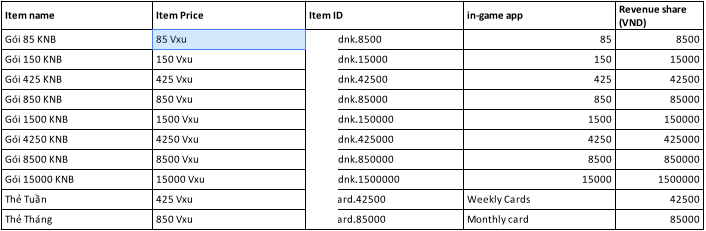
Analytics Events
The SDK forwards events to Firebase, Facebook, and Adjust. Call these after the corresponding game actions. (TikTok client SDK was removed in 6.0.4 — server-side TikTok Events API attribution still works via the ttclid captured automatically from deep links.)
When the game runs in server-to-server (S2S) mode, the SDK pulls the Firebase Analytics App Instance ID (the 32-char hex ID that backs Measurement Protocol - not the FIRInstallations FID) automatically and forwards it on every event so server-side dispatchers can target the Firebase Measurement Protocol. No additional integration code is required - keep the Firebase Analytics pod linked (already required for push) and the value is collected on first launch.
| Event | When to call |
|---|---|
logCreatedCharacter | After a new character is created |
logJoinServer:setCharacterID: | After the player selects a server and character |
logLevelUp: | After the player levels up |
logPurchase:setItemID: | After a successful purchase (pass VND revenue share) |
// Character created
[[VGPInterface sharedInstance] logCreatedCharacter];

// Joined server
[[VGPInterface sharedInstance] logJoinServer:@"server_1" setCharacterID:@"char_abc"];

// Leveled up (pass current level)
[[VGPInterface sharedInstance] logLevelUp:100];

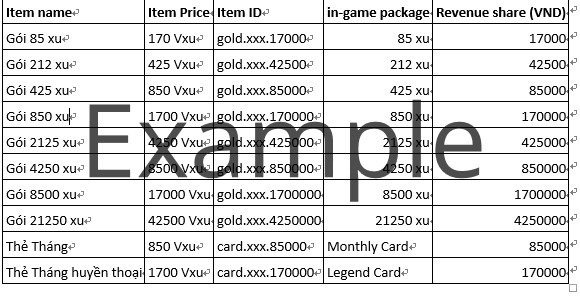
// Purchase (revenue share in VND, item ID from topup table)
// Example: user bought 85 xu ≈ 170 Vxu ≈ 17,000 VND
[[VGPInterface sharedInstance] logPurchase:17000 setItemID:@"gold.xxx.17000"];
Revenue share reference:
Always call
logPurchase:setItemID:only after the server confirms a successful transaction.
Account UI
Show the VGP account profile overlay:
[[VGPInterface sharedInstance] showProfile];
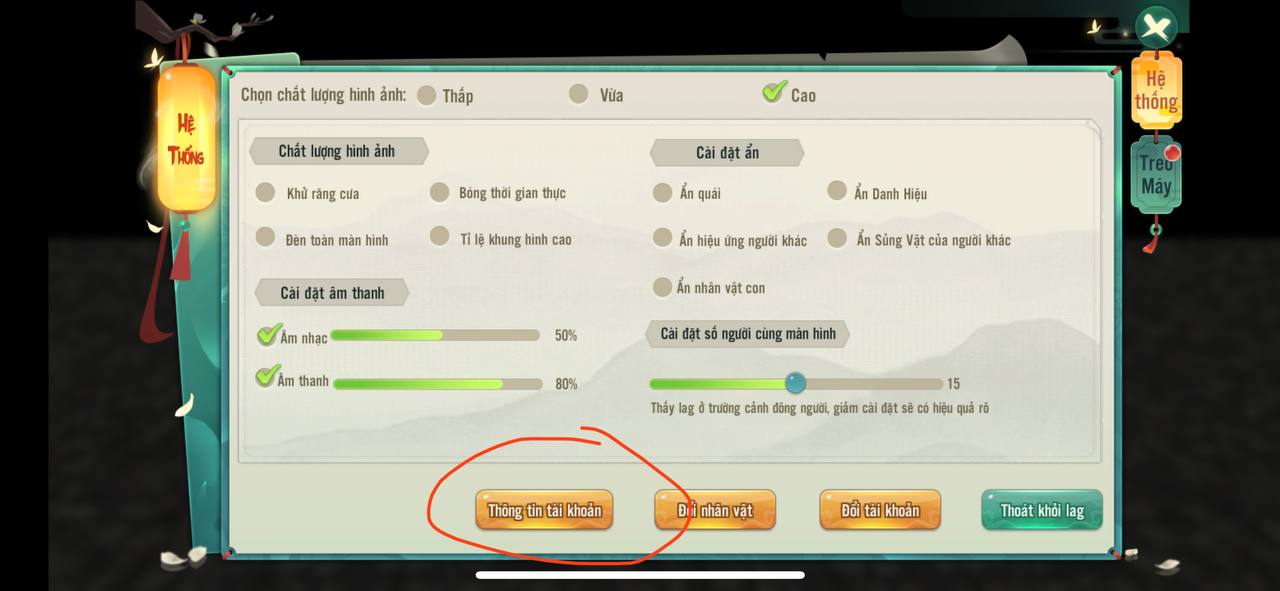
Trigger logout (e.g., from the server-selection screen):
[[VGPInterface sharedInstance] logoutGame];