开发环境
系统要求
- Xcode 26+ — App Store Connect 要求使用 iOS 26 SDK,使用旧 SDK 构建的归档在上传时会被拒绝。详见重要提示。
- Objective-C(支持 Swift 互操作)
- CocoaPods
- 部署目标仍为 iOS 13.0+ — 仅构建 SDK 升级。
标准 Podfile(原生 iOS 应用)
platform :ios, '13.0'
use_frameworks!
use_modular_headers!

target 'YourApp' do
  pod 'VGPSDK', '6.0.1'
end

post_install do |installer|
  installer.pods_project.targets.each do |target|
    target.build_configurations.each do |config|
      config.build_settings['ALWAYS_EMBED_SWIFT_STANDARD_LIBRARIES'] = 'NO'
      config.build_settings['IPHONEOS_DEPLOYMENT_TARGET'] = '13.0'
    end
  end
end
运行以下命令:
pod deintegrate
pod install
open YourApp.xcworkspace
请始终打开 .xcworkspace 文件,不要使用 .xcodeproj。
Unity3D Podfile
将 Podfile 放置在与 Unity-iPhone.xcworkspace 同级目录:
├── Pods/
├── Unity/
│   └── Unity-iPhone.xcodeproj
├── Unity-iPhone.xcworkspace
├── Podfile
└── Podfile.lock
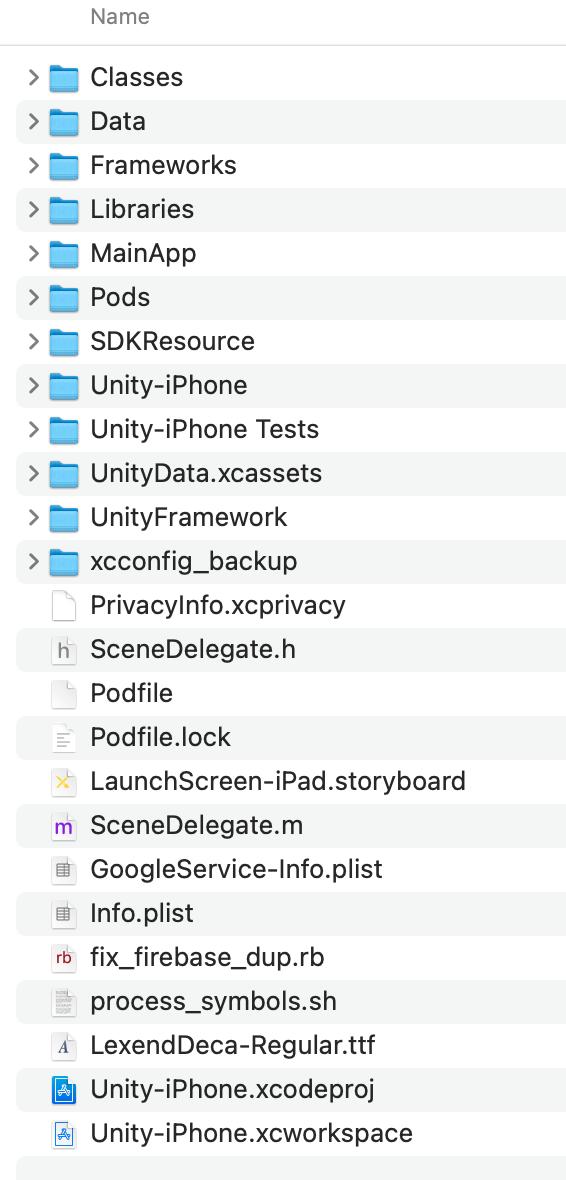
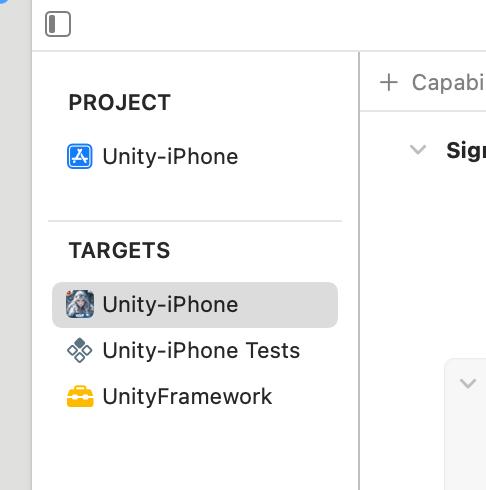
UnityFramework 项目必须包含此修复脚本,否则会出现重复框架错误
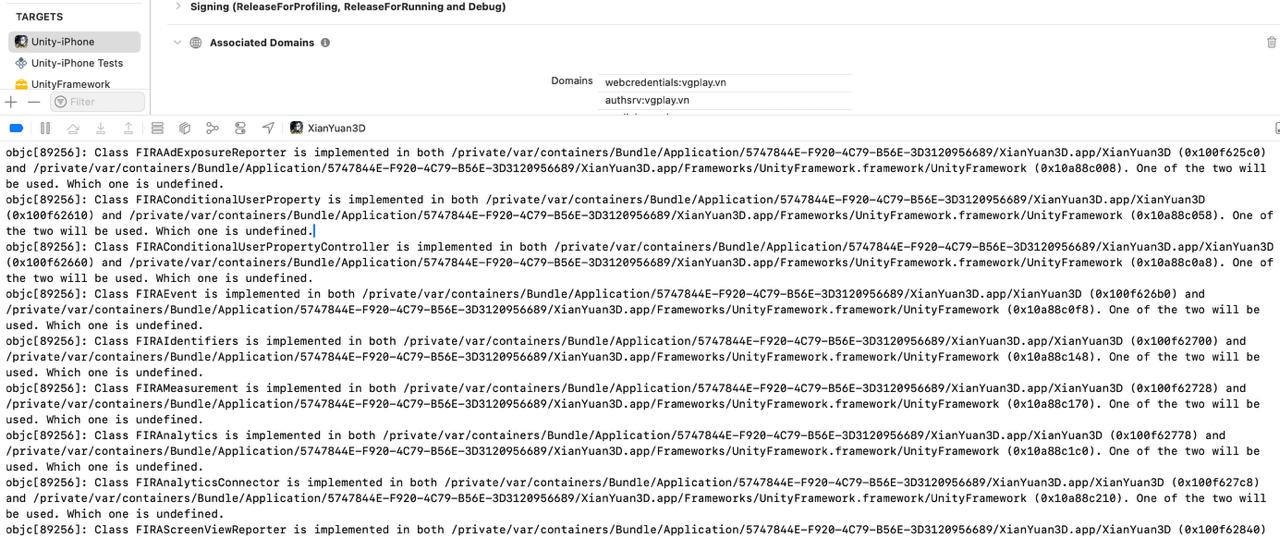
当通过 pod install 将 VGPSDK 安装到包含 UnityFramework 的项目时,Firebase、Facebook 等第三方库会被同时链接到 Unity-iPhone 和 UnityFramework 两个 Target 中,导致运行时出现重复符号崩溃:
[FirebaseCore][I-COR000029] Attempted to register protocol FIRAnalyticsInterop,
but it already has an implementation.
以下 post_install 脚本是必须的。 它会修补 Unity-iPhone Target 生成的 .xcconfig 文件,去除重复的链接器参数,确保第三方库只在 UnityFramework 中加载一次。
若省略此脚本,每次执行 pod install 后都会出现重复框架错误。
# 在中国可使用清华镜像加速安装
# source 'https://mirrors.tuna.tsinghua.edu.cn/git/CocoaPods/Specs.git'

platform :ios, '13.0'

abstract_target 'SharedPods' do
  use_frameworks!
  use_modular_headers!

  pod 'VGPSDK', '6.0.1'

  workspace 'Unity-iPhone'
  target 'Unity-iPhone' do
    project 'Unity/Unity-iPhone'
  end
  target 'UnityFramework' do
    project 'Unity/Unity-iPhone'
  end
end

post_install do |installer|
  installer.pods_project.targets.each do |target|
    target.build_configurations.each do |config|
      config.build_settings['ALWAYS_EMBED_SWIFT_STANDARD_LIBRARIES'] = 'NO'
      config.build_settings['ONLY_ACTIVE_ARCH'] = 'NO'
      config.build_settings['IPHONEOS_DEPLOYMENT_TARGET'] = '13.0'
    end
  end

  # UnityFramework 项目必须包含此脚本:
  # 修补 Unity-iPhone xcconfig 文件,去除重复的链接器参数。
  # 若缺少此脚本,Firebase/Facebook 等库将被加载两次,导致运行时崩溃。
  Dir.glob("Pods/**/Pods*iPhone*.xcconfig").each do |xcconfig_path|
    puts "Patching #{xcconfig_path}"
    text = File.read(xcconfig_path)
    text.gsub!(/^OTHER_LDFLAGS.*$/, 'OTHER_LDFLAGS = -ObjC')
    File.write(xcconfig_path, text)
  end
end
pod deintegrate Unity/Unity-iPhone.xcodeproj
pod install
open Unity-iPhone.xcworkspace
故障排除
pod install 下载失败
如果出现以下错误:
error: RPC failed; curl 18 transfer closed with outstanding read data remaining
fatal: the remote end hung up unexpectedly
fatal: early EOF
在 ~/.gitconfig 中强制 Git 使用 https:// 协议:
[url "https://github.com/"]
  insteadOf = git://github.com/
删除 Pods/ 和 Podfile.lock,然后重新运行 pod install。
UnityFramework 重复库警告
如果 Xcode 日志出现:
[FirebaseCore][I-COR000029] Attempted to register protocol FIRAnalyticsInterop, but it already has an implementation.
这说明 Podfile 中缺少 post_install xcconfig 修补脚本。请按照上方 Unity3D Podfile 章节添加该脚本,然后重新执行:
pod deintegrate Unity/Unity-iPhone.xcodeproj
pod install
也可以在不重新执行 pod install 的情况下,手动修补现有安装:
find . -name "Pods*iPhone*.xcconfig" -exec sed -i '' 's|^OTHER_LDFLAGS.*|OTHER_LDFLAGS = -ObjC|' {} +
Cocos2d-x 注意事项
将 Podfile 放在 proj.ios_mac 目录下。
如果出现与 __cplusplus 相关的编译错误,请编辑文件:Pods/FBSDKShareKit/Share/FBSDKShareKitImport.h
将:
#import <FBSDKCoreKit.h>
修改为:
#import <FBSDKCoreKit/FBSDKCoreKit.h>